BuiltforStudents.
EmpoweringTutors.
Live classes, a shared whiteboard, real-time chat, AI study tools and secure payments. Here is everything TutorWave gives each side of the classroom.
0h
Tutor verification
₹0
Trial class
0 wk
Fixed packages
0
Recordings kept
Class starts in 5 min
One-tap join
Perfect quiz · +5 XP
Streak unlocked
Ask. Watch it look it up. Get the answer.
Pick any ability below to see exactly what the assistant reads from your classroom before it replies.
Ask your notes: Searches your published notes by meaning. If the answer isn't there, it says so and uses general knowledge.
- Answers come from your own data, never guessed numbers
- Students see only their data; tutors only their students'
- Unread chats are counted, message text is never read
- Unpublished draft notes never reach students
AI can make mistakes. Check important details, and see our Terms and Privacy Policy.
Transform your learning experience
Eight steps from finding a tutor to seeing your progress. Tap any step to see exactly what you get.
 STEP 1 / 8
Google single sign-on
Quick sign-up
Get started with Google or email and tell us what you are studying.
- Google single sign-on
- Grade, board and subject preferences
- Optional guardian details
From sign-up to success, step by step
Pick a journey and scroll. Every step is handled inside TutorWave.
Sign up
Join with Google or email and set your grade, board and subjects.
Find a tutor
Filter by subject, grade, board and language, then compare ratings and prices.
Try a trial class
A 15-minute trial, where offered, to see if the tutor suits you.
Pick a package
Pay one fixed price. Sessions are placed on the tutor's availability for you.
Learn and revise
Join live with one tap, then revise from AI notes, flashcards and quizzes.
Track your progress
See attendance, poll accuracy, XP and badges, then rate your tutor.
More than just a video call
Every TutorMeet class includes the tools a real classroom needs. Sessions are live only: audio, video and whiteboard are never recorded.
TutorMeet
Live video and audio built into the dashboard, with no third-party links.
- Automatic attendance logging
- Mute, remove and lock controls
- Waiting room and breakout rooms
TutorBoard
A real-time whiteboard for drawing and diagrams.
- Students watch live as you draw
- Built into every session
- No extra software
TutorChat
One-on-one and class-group messaging.
- Questions, homework and files
- PDFs shared to a class reach student dashboards
- Available before, during and after class
Live engagement
Keep everyone participating, and keep the record.
- In-class polls and Q&A
- Live leaderboard and participation points
- Poll answers and questions saved for later review
From lesson PDF to revision kit
Tutors upload their material once. TutorWave turns it into study tools, and the tutor reviews everything before students see it.
Smart notes
Lesson PDFs become clear, structured notes students can revise from.
Flashcards
Key ideas become flashcards reviewed with spaced repetition.
Practice quizzes
Quizzes generated from the lesson give instant feedback on weak spots.
Class activity that becomes insight
Polls and Q&A from your live classes are saved, so students can see how they are doing and tutors can see what to teach again. We keep only what is needed for that, and never the class itself.
Polls
- The question, the options and the correct answer, if your tutor sets one
- Each student's answer, marked right or wrong
- Opinion polls with no right answer are saved but not scored
Q&A
- The question and who asked it
- Upvotes from classmates
- Your tutor's written reply
Never saved
- Audio, video and the whiteboard are never recorded
- Chat inside the live classroom is not kept after class
- TutorChat conversations are separate and stay in your inbox
What students see
- Their poll accuracy and a weekly trend
- Every poll they answered, with the correct answer
- Their questions and the tutor's replies
- Short insights, like a week-on-week change
What tutors see
- Class poll accuracy and questions asked
- The polls most of the class got wrong, to re-teach
- Students who haven't joined in yet
- Each student's poll and Q&A history
Students see only their own saved answers, never other students'. Questions posted during class are visible to the class while it is live.
Pay only for classes that happen
Tutors are verified, money is held in escrow, and your classes stay private.
Verified tutors
ID, certificates and payout details are reviewed by an admin, and LinkedIn profiles are linked.
How verification worksEscrow-secured payments
Payments are held in Razorpay's regulated escrow and released for verified sessions only.
How payments workLive sessions only
Audio, video and whiteboard are never recorded. Your class stays between you and your tutor.
What happens in a sessionEvery feature, in your pocket
Whether you're a student booking a class or a tutor managing a schedule, the native app carries every feature above with you.
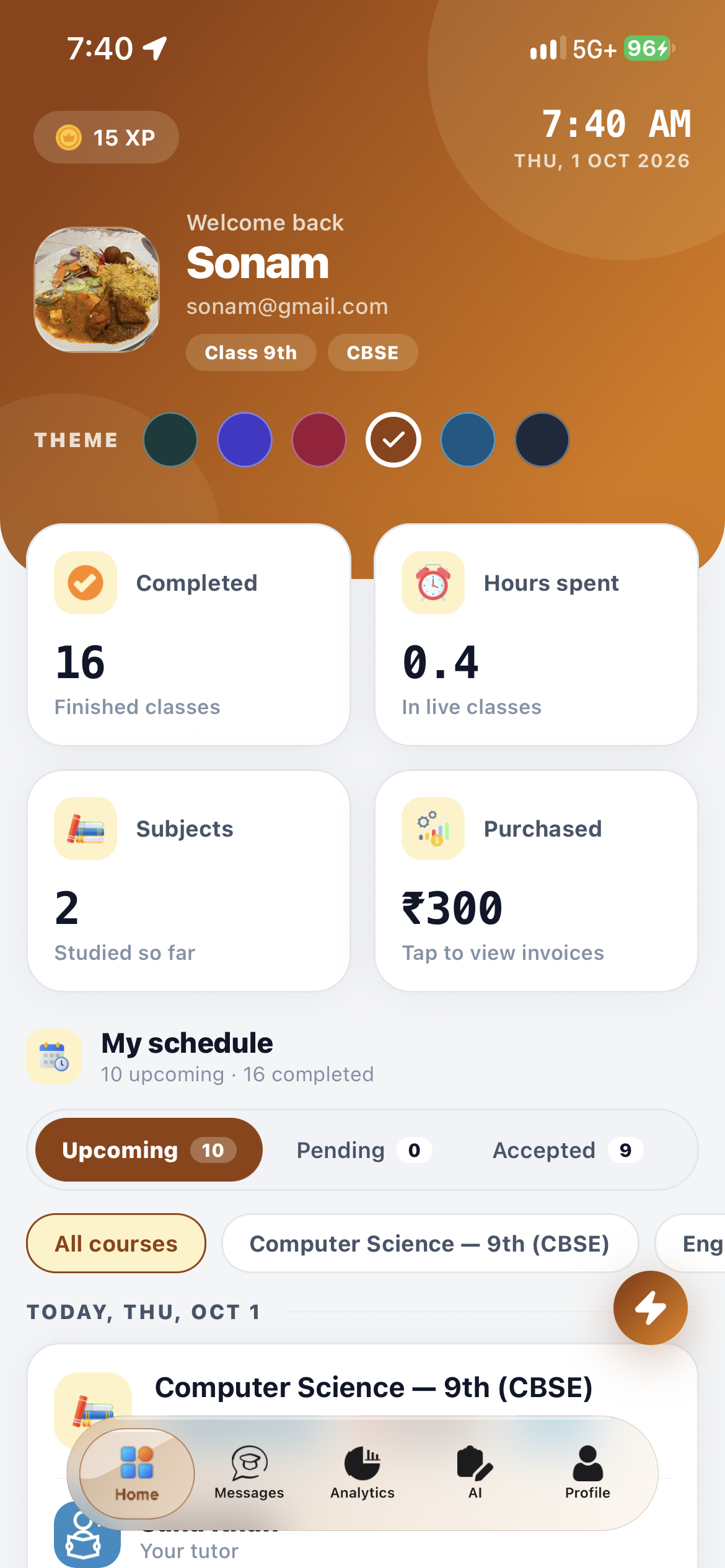
Student dashboard
Browse tutors, manage bookings and track payments from the home tab.
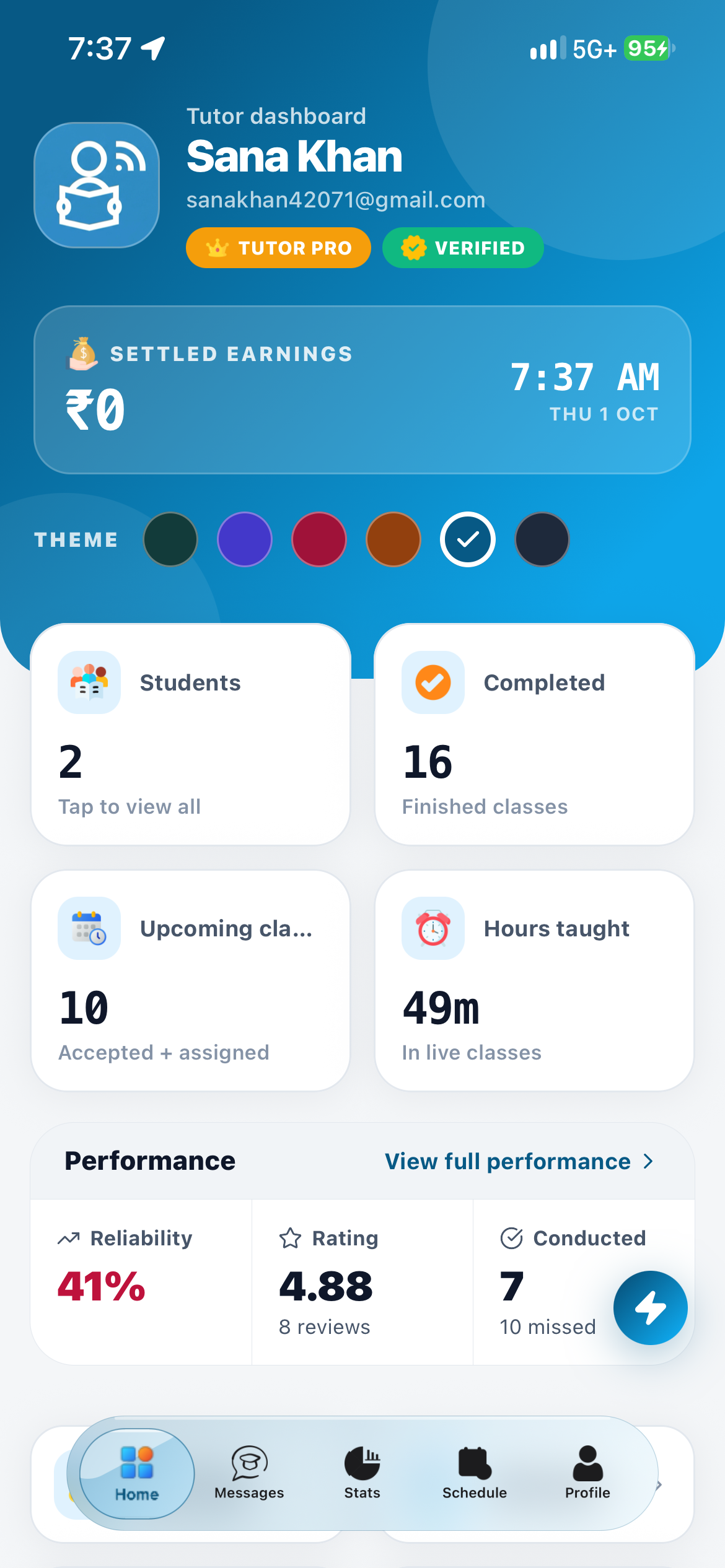
Tutor dashboard
Manage your schedule, sessions and payouts on the move.
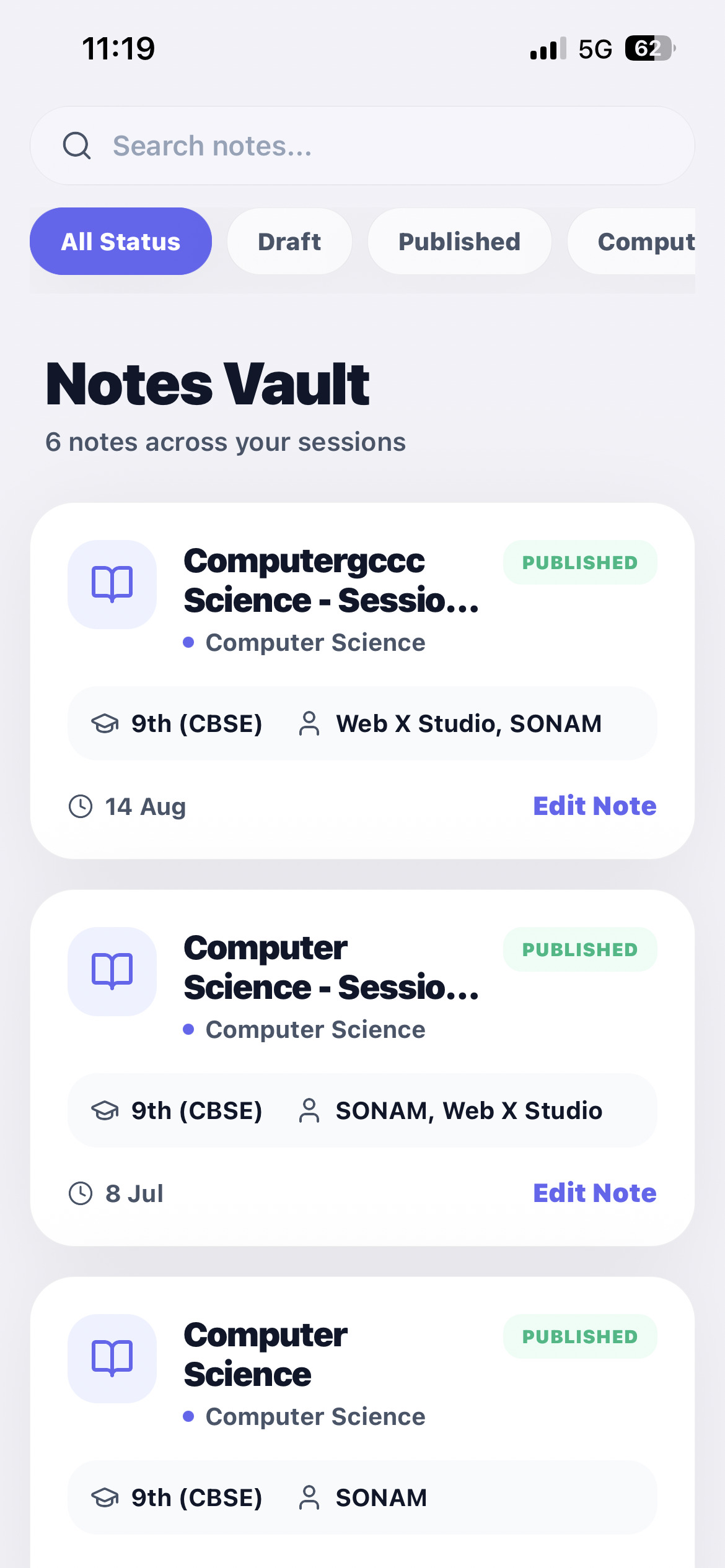
AI notes
Open lesson PDFs and interactive quizzes wherever you are.
Ready to step into the new classroom?
Join as a student or apply as a tutor and see every feature on this page working for you.